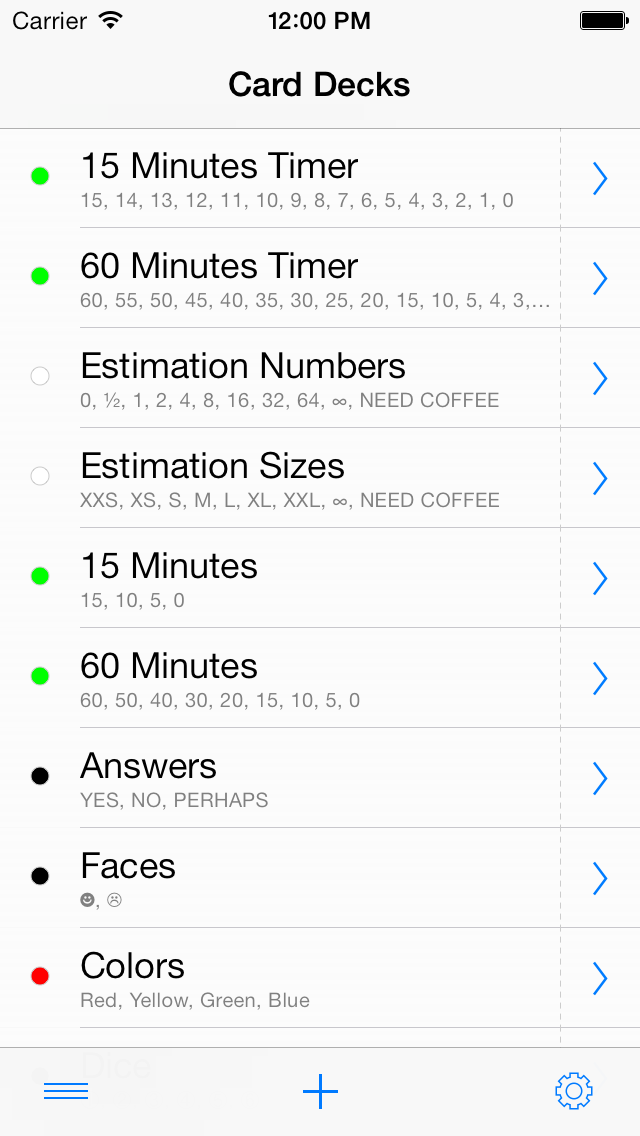
Card Decks is a small open source application for iPhone OS / iOS devices which provides simple, configurable, colored, multi-line text cards which are grouped into card decks.
A card deck can be used to show your vote or estimation on a certain topic in a meeting, e.g. in a planning meeting used in agile software development methods like Scrum or Extreme Programming. Or, if you are the chair of a session on a conference, you can use a card deck to remind a speaker of the remaining time for the presentation. Or, just use your cards to show your opinion, argument, or mood, in a simple, non-verbal way. Or, if you are a teacher, use the shuffle feature to randomly select a task from a card deck with tasks, or randomly assign tasks to students.
Card Decks contains some predefined card decks with voting cards, simple colored cards, cards with numbers, colored cards which show remaining minutes, etc. Individual card decks can be created with the built-in editor.
Additionally, Card Decks supports sending and receiving card decks via URLs, e.g. for sharing your card decks with your friends or colleagues by e-mail. More information about the format of Card Decks URLs can be found below.
Found a bug? Missing a feature? Drop a line to carddecks@0xc0.de, or open an issue in the project on GitHub
Card Decks is open source and licensed under the terms of the MIT license. It's source code is hosted on GitHub.
Card Decks is available as a free application in the App Store.
The Card Decks URL Scheme
If installed on your iPhone OS / iOS device, Card Decks will be opened when you click on an URL which starts with 'carddecks://', which designates an URL based on the Card Decks URL scheme. When opened, Card Decks will run the action which is encoded into the URL.
In Card Decks 1.x, only a single URL action, the 'add a new card deck' action, is available. This action will add the card deck which is encoded into the URL to your set of card decks.
Examples:
A version 1 'add a new card deck' URL has the following structure:
carddecks:///add?<deck>[&<card>[&<card>[...]]]
where <deck> contains the name of the card deck, the default text color, and the default background color which is used for the deck's cards. A <card> entry contains the card's text, and optionally its text color and background color.
The structure of <deck> is as follows:
<name>,<default-text-color>,<default-background-color>
where occurrences of the comma ',' character inside the card deck's name must be escaped as '%2c', because the comma is used for separating the different components of the card deck definition. The default text color and background color are specified as 6 digit red-green-blue hexadecimal numbers, e.g. 'ffffff' for white, 'ff0000' for red, and '000000' for black.
A <card> entry has basically the same structure as <deck>:
<text>[,[<text-color>][,[<background-color>]]]
but specifying the colors is optional.
Since version 1.1, a <card> entry may contain a text orientation:
<text>[,[<text-color>][,[<background-color>][,[<text-orientation>]]]]
Valid text orientations are 'u'(p), 'r'(ight), 'd'(own), and 'l'(eft). The default text orientation is 'u'.
In order to use special characters in the <text> or <name> field, simply add the URL encoding of a character's UTF-8 encoding, e.g. '%e2%98%ba' encodes the smiling face character '☺' and '%e2%98%b9' encodes the frowning face '☹'.
While Card Decks 2 still understands the URL format of Card Decks 1.x, it uses a new format when sending card decks by e-mail in order to encode a card deck's settings, the default card, etc.
A version 2 'add a new card deck' URL has the following structure:
carddecks:///2/add?<deck>&<default-card>[&<card>[&<card>[...]]]
where <deck> contains the name of the card deck and the deck's settings, e.g. whether auto-rotation is enabled. <default-card> defines the values for the deck's card defaults which will be used when a new card is added to the deck.
Examples:
The structure of <deck> is:
<name>[,<setting>[,<setting>[...]]]
where possible settings are:
-
Grouping:
g<size>, e.g. 'g5' for groups of 5 cards. 'g0' turns grouping off. -
Deck Style:
d<style>: 'd0' for the side-by-side style, and 'd1' and 'd2' for the stacked styles. -
Corner Style:
c<style>: 'c0' for rounded corners and 'c1' for cornered corners. -
Index Dots:
id<on>: 'id0' for off, 'id1' for on. -
Index Style:
is<style>: 'is0' for light index dots, 'is1' for dark ones. -
Index Touches:
it<on>: 'it0' for off, 'it1' for on. -
Auto Rotation:
r<on>: 'r0' for off, 'r1' for on. -
Shake:
s<type>: 's0' for off, 's1' for shake, 's2' for random.
A <card> entry is an extended version of the <card> entry from version 1.x which adds a value for the card's font size:
<text>[,[<text-color>][,[<background-color>][,[<text-orientation>][,[<font-size>]]]]]
The font size is a value between '0' and '100' where '0' denotes that the card's text will be auto-sized to fit the card.
Additionally, Card Decks 2 supports 8 digit red-green-blue-alpha hexadecimal numbers for colors, e.g. 'ffffffff' for white, or 'ff000080' for red with an alpha value of 0x80.
Bugs and Feature Requests
Please send bugs, feedback, and feature requests to <carddecks at 0xc0.de>.
Copyright and License
Copyright 2009-2012 Arne Harren <ah at 0xc0.de>.
Permission is hereby granted, free of charge, to any person obtaining a copy of this software and associated documentation files (the "Software"), to deal in the Software without restriction, including without limitation the rights to use, copy, modify, merge, publish, distribute, sublicense, and/or sell copies of the Software, and to permit persons to whom the Software is furnished to do so, subject to the following conditions:
The above copyright notice and this permission notice shall be included in all copies or substantial portions of the Software.
THE SOFTWARE IS PROVIDED "AS IS", WITHOUT WARRANTY OF ANY KIND, EXPRESS OR IMPLIED, INCLUDING BUT NOT LIMITED TO THE WARRANTIES OF MERCHANTABILITY, FITNESS FOR A PARTICULAR PURPOSE AND NONINFRINGEMENT. IN NO EVENT SHALL THE AUTHORS OR COPYRIGHT HOLDERS BE LIABLE FOR ANY CLAIM, DAMAGES OR OTHER LIABILITY, WHETHER IN AN ACTION OF CONTRACT, TORT OR OTHERWISE, ARISING FROM, OUT OF OR IN CONNECTION WITH THE SOFTWARE OR THE USE OR OTHER DEALINGS IN THE SOFTWARE.
Card Decks contains LibComponentLogging, a logging library for Objective-C applications which provides conditional logging based on log levels and log components. The library is licensed under the terms of the MIT license.
LibComponentLogging
0xc0.de/LibComponentLogging
Copyright 2008-2011 Arne Harren <ah at 0xc0.de>.
Permission is hereby granted, free of charge, to any person obtaining a copy of this software and associated documentation files (the "Software"), to deal in the Software without restriction, including without limitation the rights to use, copy, modify, merge, publish, distribute, sublicense, and/or sell copies of the Software, and to permit persons to whom the Software is furnished to do so, subject to the following conditions:
The above copyright notice and this permission notice shall be included in all copies or substantial portions of the Software.
THE SOFTWARE IS PROVIDED "AS IS", WITHOUT WARRANTY OF ANY KIND, EXPRESS OR IMPLIED, INCLUDING BUT NOT LIMITED TO THE WARRANTIES OF MERCHANTABILITY, FITNESS FOR A PARTICULAR PURPOSE AND NONINFRINGEMENT. IN NO EVENT SHALL THE AUTHORS OR COPYRIGHT HOLDERS BE LIABLE FOR ANY CLAIM, DAMAGES OR OTHER LIABILITY, WHETHER IN AN ACTION OF CONTRACT, TORT OR OTHERWISE, ARISING FROM, OUT OF OR IN CONNECTION WITH THE SOFTWARE OR THE USE OR OTHER DEALINGS IN THE SOFTWARE.